Short answer: Moodle does not detect AI, and it does not detect plagiarism either. Moodle's own documentation states that the platform "doesn't come with any pre-installed plagiarism prevention methods." Whether your submission is ever scanned depends on a plugin a site administrator chose to install, and on whether your teacher switched it on for that one activity.
That makes Moodle different from the other two big learning platforms, and it is why the answers you find online contradict each other. Two students on two Moodle sites can submit identical work and get completely different treatment: one gets a similarity report with an AI percentage attached, the other gets nothing but a timestamp. Neither outcome tells you anything about Moodle. It tells you what their institutions installed.
This page separates the three layers that get blurred together, shows which plugins are actually in use across Moodle sites today with the numbers, and explains how to read the signals in your own Moodle so you know which situation you are in.

Almost every confusing claim about Moodle comes from collapsing three separate systems into one word.
So "does Moodle detect AI" has no single answer. The accurate question is: which plugin did my institution install, and did my teacher turn it on for this assignment? Everything else follows from that.
Because layer three does the work and layer one only displays the result, students reasonably conclude Moodle did it. The report appears inside Moodle, next to their file, under the Moodle logo. It is still someone else's verdict.
Moodle has real integrity-relevant features. None of them analyse writing style.
When you upload, Moodle records the file, its size, and the exact submission time, and it keeps that record after the deadline. Teachers use it, and it is genuine evidence of when you submitted. It says nothing about who wrote the words.
Moodle keeps course logs that a teacher with the right permission can read: which pages you viewed, when you opened a quiz, how many times you attempted something. This gets widely mistranslated into "Moodle can see me switch tabs" or "Moodle knows I pasted that." It cannot. A Moodle log is a record of requests your browser made to the Moodle site. It has no visibility into other tabs, other applications, your clipboard, or your screen.
Moodle integrates with Safe Exam Browser, a customised browser for Windows, macOS and iOS that locks a quiz down. Per Moodle's documentation it blocks the URL bar, back and forward navigation, reloads, switching to other applications, shortcuts such as Alt+Tab and Print Screen, screenshots, the right-click menu, and optionally spell-check and dictionaries, and it can allow a named list of sites through.
That is a real restriction, and it is about exam conditions. Safe Exam Browser never reads a term paper and decides it was machine-written. Keep the two ideas apart: lockdown guards a live test, AI detection scores submitted text, and they are separate tools bought and enabled separately.
This is the part most guides miss. Moodle does now ship AI, through an AI subsystem introduced in Moodle 4.5 and extended in 5.0, configured under Site administration, General, AI. It works through provider plugins, so any open-source or commercial large language model can be wired in, and its actions are things like generating text and images in the editor, summarising course content, and explaining content.
Every one of those actions produces language. There is no detection action and no detection placement. Moodle's investment in AI is in helping teachers and students write, not in judging whether a human did. If someone tells you "Moodle has AI now, so it must detect AI," that is the confusion to correct.
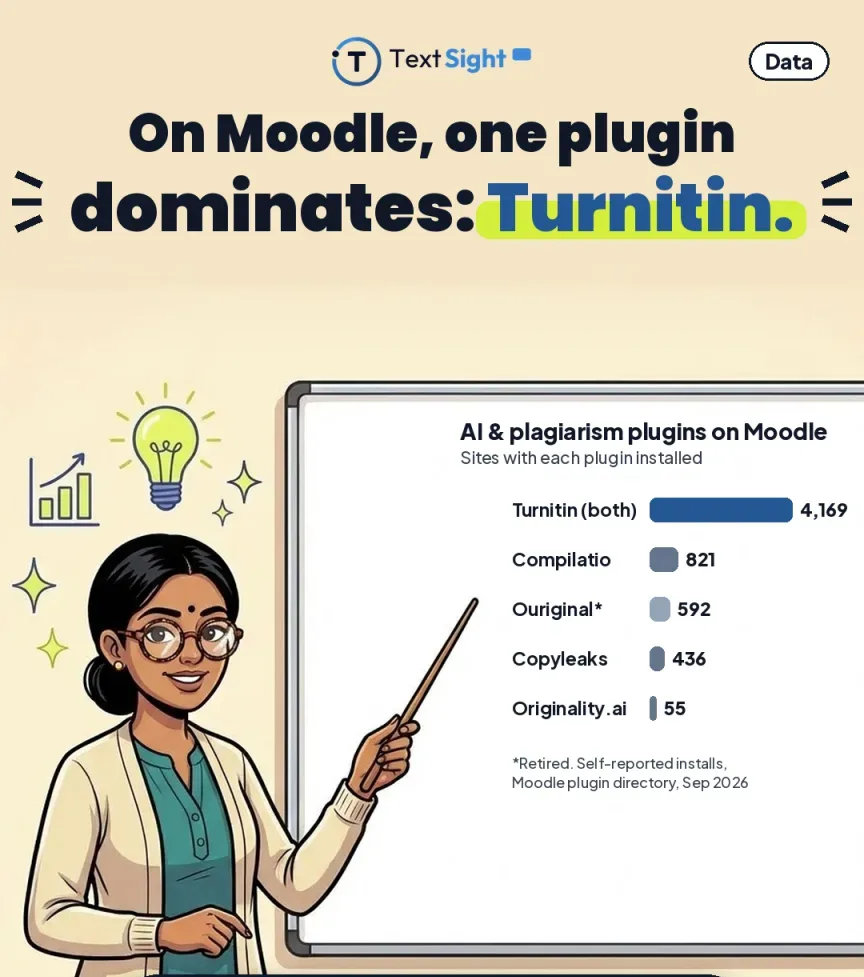
Since the plugin layer decides everything, it is worth knowing what is really out there. These are the plagiarism plugins listed in the Moodle plugin directory with their reported install counts, captured 28 September 2026.

| Plugin | Sites | Looks for AI writing? |
|---|---|---|
| Turnitin plagiarism plugin (Moodle Direct v2) | 2,965 | Licence-dependent |
| Turnitin Integrity plugin | 1,204 | Licence-dependent |
| Compilatio Plagiarism and AI Content Detector | 821 | Yes, per its name |
| Ouriginal (deprecated) | 592 | No, retired product |
| Copyleaks Plagiarism and AI Content Detector | 436 | Yes, per its name |
| PlagiarismCheck.org | 198 | Not stated |
| Originality, Plagiarism Detection | 194 | Not stated |
| StrikePlagiarism | 191 | Not stated |
| Advacheck | 71 | Not stated |
| PlagiarismSearch | 69 | Not stated |
| Originality.ai Plagiarism & AI Detection | 55 | Yes, per its name |
Counts are self-reported by Moodle sites that share usage statistics, so read them as relative popularity rather than a census. Five further plugins are listed with one to five installs each, which is a reminder that being in the directory is not evidence of being used anywhere. "Licence-dependent" means the plugin can surface an AI writing indicator, but only if the institution's Turnitin licence includes AI writing detection and an administrator left it enabled. Copyleaks advertises AI detection in more than 30 languages with coverage of GPT, Gemini and Claude; Ouriginal was retired after Turnitin acquired it.
Three things fall out of that table. First, Turnitin dominates: the two Turnitin plugins together account for more installs than everything else combined. Second, a deprecated plugin is still the fourth most installed, which tells you how slowly institutional plumbing gets updated. Third, and most important for a student asking this question, most of these plugins are similarity checkers. Only a minority put AI detection in their own product description.
If your institution uses Turnitin with Moodle, and statistically that is the likeliest case, there are two different plugins it could be running, and they behave differently.
The older integration. It creates a Turnitin assignment inside Moodle and gives direct access to Turnitin's own tools, including the similarity report, grading, feedback, parts and peer review. It is being replaced by the LTI 1.3 integration, though the retirement dates have been extended more than once.
The current one, developed and maintained by Turnitin. It attaches Turnitin's similarity report to native Moodle activities, assignments, forums, quizzes and workshops, and serves Turnitin Originality, Similarity or SimCheck depending on the licence your institution bought.
The AI writing report is a feature of the Turnitin account, not of Moodle and not of the plugin. Whether you ever see an AI percentage depends on the licence tier your institution holds and on whether an administrator left the feature switched on. Institutions do switch it off, deliberately, and we come back to why below.
There is a practical consequence here. A teacher can be looking at a Turnitin similarity score inside Moodle with no AI indicator anywhere on the screen, and still say "Moodle flagged your essay." Asking which tool produced which number is a fair and useful question, and we walk through how to have that conversation in what to do if you are accused of using AI.
You do not have to guess. A plugin changes what the submission page looks like.
And remember the layer no plugin covers: a teacher who has read your earlier work notices a sudden change in voice, citations that do not resolve, or an argument that does not match how you talk in class. That kind of noticing needs no software at all, which is why our guidance for educators at AI detection for teachers treats a score as the start of a conversation rather than the end of one.

Once a number appears next to your submission, the first useful question is whose number it is. On Moodle that is a genuinely open question, because the install table above lists eleven products in active use, and they do not make comparable claims about themselves.
Those percentages come from vendors testing their own products on their own material. They are not measurements of the same thing, they are not independently reproduced, and they cannot be lined up against each other as though they were. Institutions have acted on that gap: Vanderbilt University switched Turnitin's AI detector off in August 2023, partly because Turnitin does not explain what patterns the model looks for.
So the question to ask about a Moodle flag is not "how accurate is AI detection." It is which plugin produced this number, and what has that vendor published about its own error rate? On a Moodle site, nobody can answer the first question for you from the outside.
Whatever the vendor, a detector output is a probability about style, not a record of what you did. A score of 35 percent does not mean a machine wrote 35 percent of your paper. Independent research has repeatedly found human writing misclassified as machine writing, most severely for people writing in a second language, and we cover that evidence properly in AI detector false positives, can AI detectors be wrong and AI detector accuracy explained. Turnitin's own guidance is that its score should not be the sole basis for adverse action against a student, and that is the right standard to hold any of these plugins to.

You cannot choose which plugin your institution installed, whether an administrator left AI detection enabled, or which vendor's threshold your paragraph lands near. There is exactly one lever on your side of it, and it is available before you submit rather than after.
Read your own draft the way a detector reads it. Flat, evenly paced, unusually predictable prose is what these models score highest, and that description fits plenty of careful human writing, especially writing done under pressure or in a second language. Seeing which of your own passages look that way is useful regardless of what any institution has installed, because the fix is the same: put the specifics, the examples and the argument back in your own voice.
TextSight's free AI detector returns a probability with sentence-level highlights, so the output points at particular lines rather than handing you a verdict on a whole paper, and the document detector takes a file if that is what you are uploading to Moodle. We are direct about what it is not: a guide for revising your own work, never a judgment on anyone else's, and less certain on heavily edited and second-language writing. The accuracy methodology sets out how we test it.
Then keep your working files. A real revision history in Google Docs or Word is the strongest authorship evidence you can produce, it costs nothing to accumulate, and it does not depend on anyone agreeing about detector accuracy. How to prove you did not use AI covers how to assemble it, and the appeal letter guide covers what to write if you need to.
Moodle, Blackboard and Canvas have ended up in three different places, and Moodle's is the one that varies most between institutions.
Blackboard ships a checker of its own, SafeAssign, and its vendor has published a refusal to add AI detection to it, which at least makes Blackboard's behaviour predictable across every institution that uses it. Canvas ships no checker but does ship a documented integration framework, so an AI score arrives through a known, standard socket. Moodle ships neither the checker nor a single expected route, which means the answer is set entirely by a local decision about which of eleven plugins to install, and then by a per-activity decision by your teacher.
That is the practical reason advice about Moodle contradicts itself so often online. Guidance written by somebody whose university runs the Turnitin Integrity plugin with AI detection licensed is simply describing a different system from guidance written by somebody whose college installed nothing at all. Both can be accurate. Neither generalises.
If you teach on Moodle, our guidance for educators and Turnitin compared with TextSight cover using a score without over-trusting it. If you are studying, start with the student guide, then AI detection at college level or at high school level.
TextSight is an AI-detection and writing-trust tool. We help you check and improve your own work, and we do not help anyone disguise AI writing or evade an institution's detection. Moodle does not detect AI writing on its own, the plugins that do return probabilities that can be wrong, and plugin install figures on this page were captured from the Moodle plugin directory on 28 September 2026.
TextSight's free tier gives you daily scans with sentence-level highlights, so you can see which lines carry the AI signal and why. Every score is a probability, not proof, and we say so plainly.